 OSTUM
Doomsday AI
What belongs on an offline AI drive, what OSTUM Desktop can do on Windows and how to test the kit before you need it.
Imagine you're on a train, forty minutes from a meeting. Your laptop holds a 47-page contract, a supplier's old price list and a voice message from a colleague. You remember someone changing the delivery date. Where did they put it? The train has just passed the last stretch with reception.
That's the case for keeping a USB drive with an AI assistant on it. A train journey makes a convincing enough rehearsal for doomsday. So does an office where contracts have to stay on company hardware. OSTUM Desktop was built around that idea. The drive carries the installer, the local model and the tools you chose in advance. The Windows PC does the computing.
What answers when the connection drops?
OSTUM 5.7.0 recommends Zarum 9B, its local configuration of Qwen3.5-9B. It uses quantized GGUF weights, a vision projector for images and the llama.cpp runtime. It can run on a CPU or use a compatible GPU. Basic chat requires no account. The app's menus and built-in help are in Russian. The English guides give the original button labels so you can find them.
Try asking for the delivery deadline in a contract and the paragraph that gives it. Open the paragraph and check the wording yourself. You can attach PDFs, Word documents, plain text and tabular files. Windows OCR reads scanned pages locally. The chat also accepts photos and a one-off screenshot of a selected display. You choose which folders the assistant can access and what it can do there. Windows tools can list windows, minimize a selected one or open Calculator. Older conversations can be searched, archived and deleted.
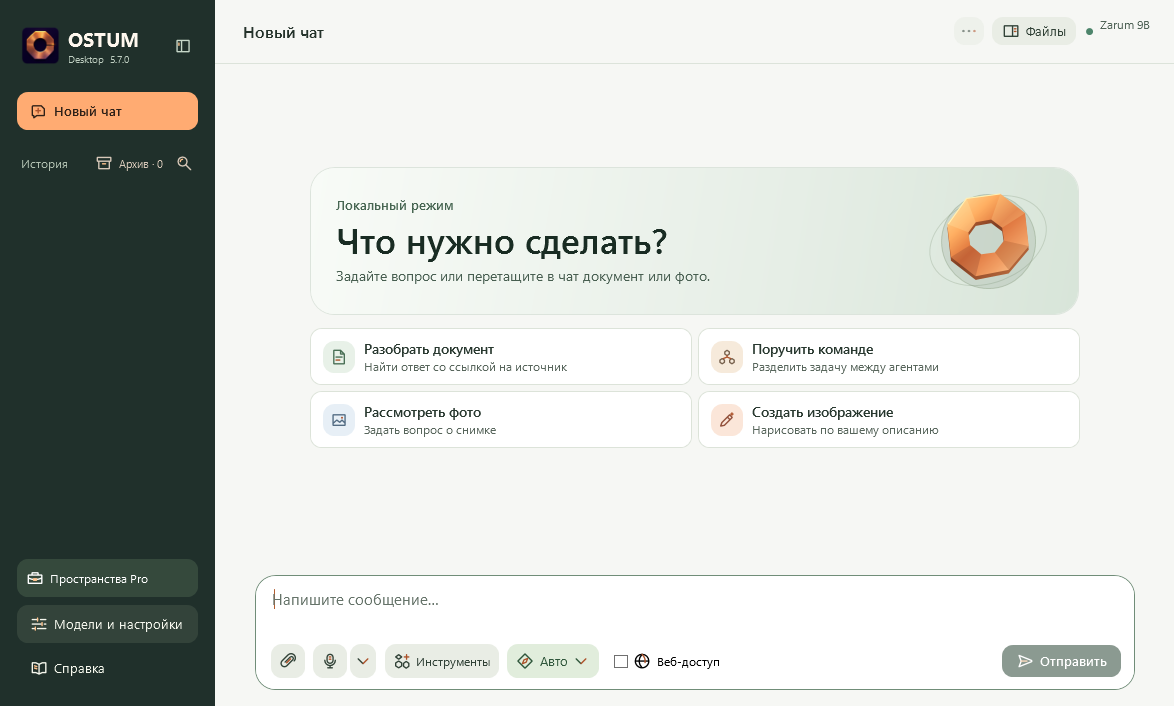
Give a second reader the same evidence
A short request can go straight to the model. For “Find inconsistencies in these terms and quote the relevant passages,” you can ask a team. An analyst and a fact checker work in parallel, a reviewer looks over the results and an editor assembles the answer. Small animated lights show the roles at work. They share one installed language model. Following a quotation back to its source is still the part that makes a conclusion worth using.
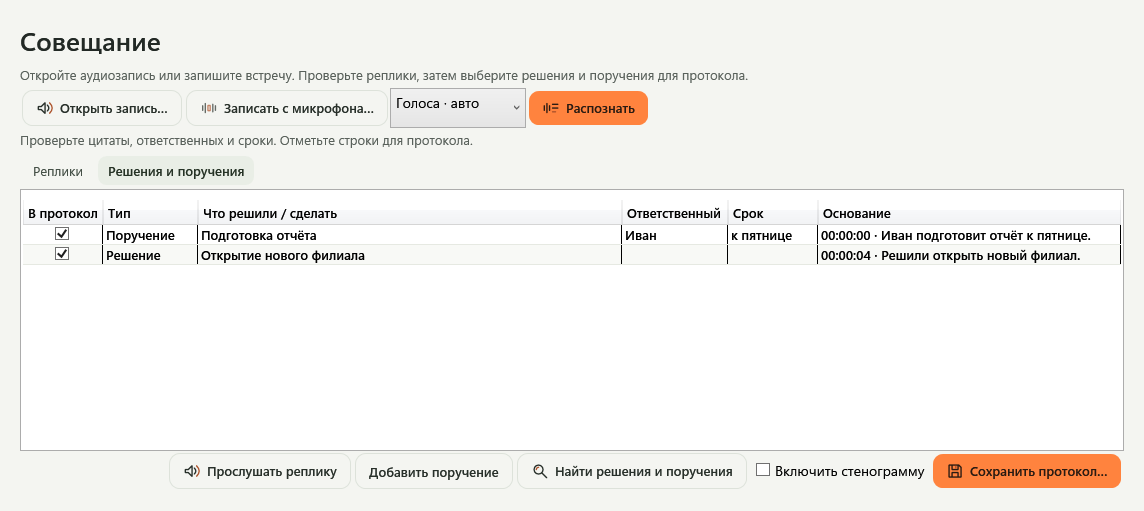
Turn a recording into minutes you can check
Select a microphone to dictate and use the local voice output to hear an answer. If the Whisper component is installed, you can also import a meeting recording. Transcribe it, ask Zarum to extract decisions and action items, and play the sentence behind any proposed assignment. Correct a name, check the due date and select the rows to export. Speakers are approximate on a single mixed audio track. Try a short meeting example
With the local Z-Image-Turbo component you can generate an illustration. An optional ACE-Step download adds instrumental music. Ask for twelve seconds of quiet electronic music, listen to the result and save a WAV file. The music tool supports clips from 10 to 60 seconds. Pack these components before disconnecting.
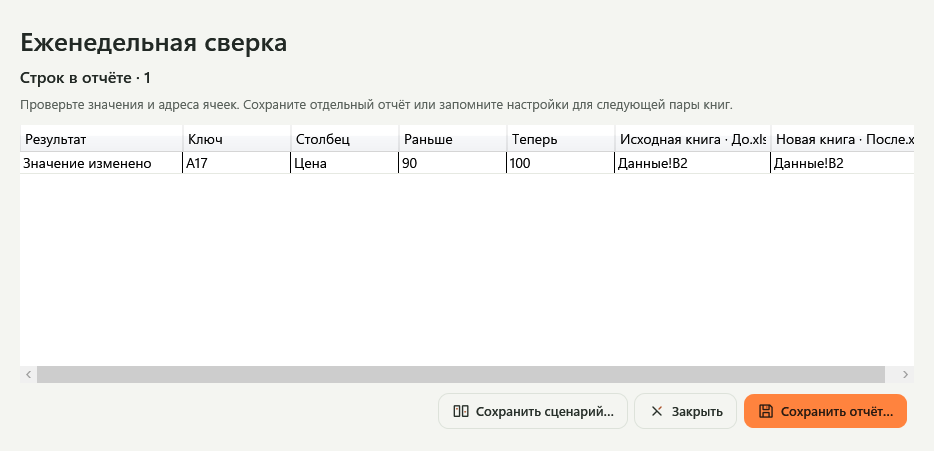
A four-product spreadsheet makes an honest test
In the two sample workbooks, product A17 went from 90 to 100 rubles. Two other products swapped positions, one disappeared and another was added. OSTUM Pro matched product codes across both sheets. It reported three differences. Open cell B2 in each workbook to confirm the price. The preview shows the original cell addresses, and saving produces a separate report. A saved recipe lets you repeat the comparison with next week's files. Download both workbooks and reproduce the result
The Pro Word and Excel editors sit beside the conversation. Review a proposed change to a paragraph or a cell, select the edits to save, or restore an earlier version. Other workflows compare contract revisions, collate supplier offers, review invoices and create tasks linked to their source paragraph or cell. Due dates can be exported to a calendar.
Teach it a workflow on your own PC
You can set a working profile immediately. In Pro, a project can also train an output-layer LoRA adapter on 5 to 200 reviewed question-and-answer pairs from at least three independent groups. Training runs locally. A comparison with the base model on held-out examples shows improvements and regressions before you decide whether to enable the adapter in that project. You can import a compatible GGUF from disk or use the model catalogue. Vision needs a matching projector.
A company policy can restrict folders and disable external connections. In a personal installation, optional web search sends a query online when enabled. New model downloads and the online update service also need connectivity. An isolated workstation can receive an updated installer by USB. F1 opens the built-in offline help. Administrator's guide
Build the drive and rehearse once
- Start on a connected PC. OSTUM supports Windows 10 and 11 x64. The 5.7.0 installer is 108.3 MiB. A full first installation downloads six model files totalling 13.38 GB. The optional music component adds 2.71 GB. The release provides an unsigned EXE and its SHA-256 checksum. Windows release and checksum
- Pack the complete folder. The project's script collects the installed files in
Ostum-Offline. A full 5.7.0 kit with dictation, drawing, music and CUDA takes about 17.6 GB. A 32 GB exFAT or NTFS drive is one practical choice. Copy the folder with its installer,Models,AccelerationandOSTUM-OFFLINE.txt. USB preparation instructions - Try it disconnected. For Zarum 9B, start with 16 GB of RAM and at least 20 GB free on the target SSD. Turn off the network, install from the prepared folder, ask a question, attach a familiar picture and dictate a sentence. For Pro, scan the workstation's QR code with an online phone. After a one-time check of membership in the developer's Telegram channel, carry the signed activation file back to the offline machine. Pro access is permanent for that installation and Windows user.
Performance depends on the computer. On a Ryzen 7 7435HS laptop with 16 GB RAM and a 6 GB RTX 4050 Laptop GPU, a short CUDA run produced 13.1 tokens per second. Loading the model took 11 seconds. The built-in benchmark measures both on your machine. Benchmark conditions and measurements
Before putting the flash drive in a drawer, add a manual for an appliance you own. Disconnect the laptop and ask how to change the filter and which page explains it. Checking that one answer against the manual will tell you more about your kit than another afternoon spent collecting installers.
Published by the OSTUM Desktop project. The text and cover were prepared with AI assistance. Features were checked against release 5.7.0, and the workbook example against the project's comparison engine. OSTUM source code