 OSTUM
Turn a recording into reviewed meeting minutes
Transcribe speech with Whisper, inspect proposed actions from a local model and export the rows you can trace to the recording.
Start with two statements
Make a short test recording in a language your local speech model supports. Give one person a task and deadline, then record a decision without an owner. For example, say “Ivan will prepare the report by Friday”, pause, then say “We decided to open a new branch”. The difference gives you something concrete to check in the exported minutes.
- Install the dictation module and select a Windows microphone from the arrow next to the dictation button. Type Открой совещание in chat. Open your recording or make one from the microphone.
- Click Распознать to transcribe with local Whisper. Each utterance has a timestamp. Double-click to correct a word or speaker label. On a single audio channel, the speaker groups are approximate.
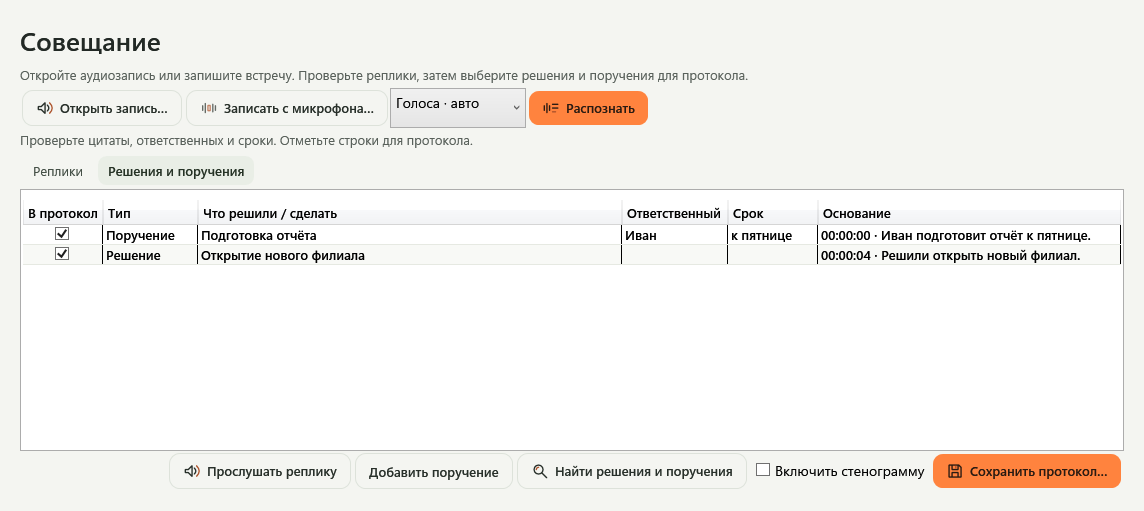
- Click Найти решения и поручения. The local language model proposes decisions and actions. Inspect the quote and use Прослушать реплику to listen to the corresponding moment.
Choose what belongs in the record
For the report, check the owner and the words “by Friday”. An actual calendar date may need clarification. For the branch decision, keep the missing details empty unless the recording supplies them. Correct a proposed row, exclude it or add an action manually from a selected utterance.
Use Сохранить протокол to export selected rows to a new text file. Select Включить стенограмму to include the transcript. Recordings in a work folder require project permission for local analysis. The destination also has to meet the project’s access rules.
OSTUM accepts up to four hours of mono or stereo audio. Playback and the source quote remain useful checks even on clean recordings. The app processes audio locally after the required components have been installed.